Getting Started: General-Purpose AI Assistants
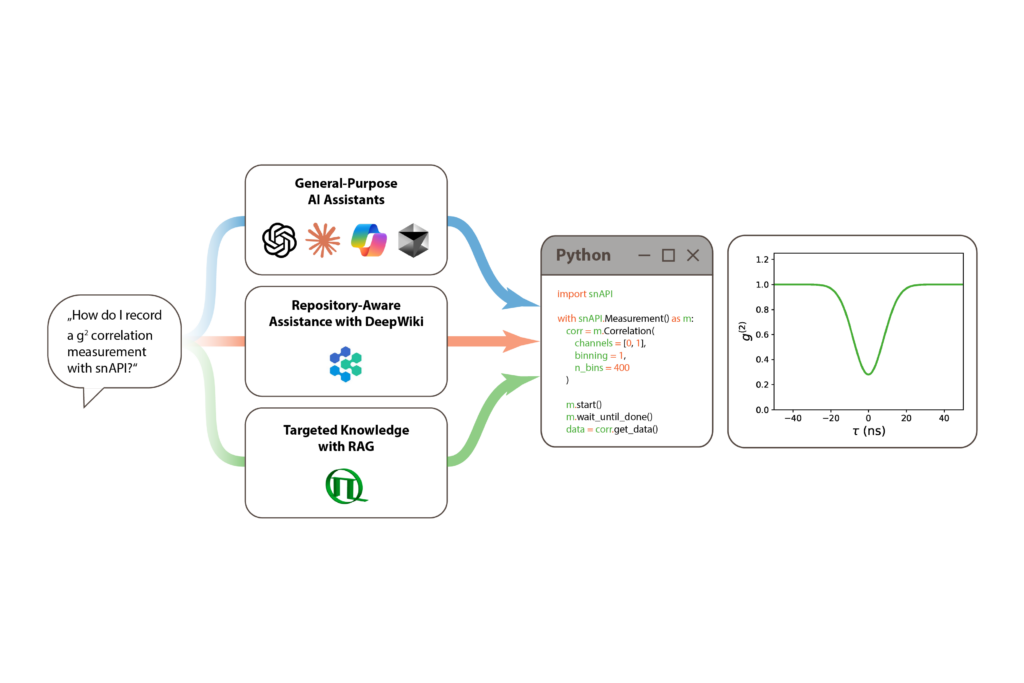
The simplest way to use AI for programming with snAPI is to ask a general-purpose AI assistant such as ChatGPT, Claude, GitHub Copilot, or Cursor. Describe what you want to measure or analyze, and the assistant can help you generate, adapt, or troubleshoot Python code.
AI assistants with web access can draw on publicly available snAPI resources, including the online documentation, GitHub repository, demo scripts, and other relevant sources. This makes the approach particularly flexible and easy to use, as no additional snAPI-specific setup is required.
However, the assistant has to find, select, and interpret the relevant information itself. The quality of the result therefore depends on the sources retrieved and the context available to the AI. Generated code should always be reviewed and tested before use.
Repository-Aware Assistance with DeepWiki
DeepWiki takes a repository-aware approach by turning the snAPI GitHub repository into a structured, AI-generated knowledge base. It organizes information into dedicated topics and combines explanations with source references and visual representations of relationships, workflows, and data structures.
This makes DeepWiki useful not only for finding code, but also for understanding how snAPI works. Users can explore concepts and workflows visually or ask questions about the repository through an AI-powered interface.
As DeepWiki is an external service, its content reflects the version of the repository that has been indexed. For the latest API details, its information should therefore be checked against the current snAPI documentation.
Providing Targeted Knowledge with RAG
The dedicated snAPI RAG (Retrieval-Augmented Generation) combines targeted snAPI knowledge with AI assistance directly in your development environment. It indexes selected resources, including API methods, constants, documentation, demo scripts, and information from diagrams, and retrieves the content most relevant to your specific task.
Via the Model Context Protocol (MCP), the RAG can be integrated into compatible AI coding tools. This means that scripting happens right where you develop and run your snAPI code: the AI can use relevant snAPI context while helping you create, modify, or troubleshoot scripts directly in your development workflow – without having to copy code back and forth from a web-based AI assistant.

By combining targeted retrieval with direct integration into the coding environment, the RAG provides a more streamlined workflow for AI-assisted snAPI development. As with any AI-generated code, the results should still be reviewed and tested before use.
Which Approach is Right for You?
The right approach depends on how you want to work. General-purpose AI assistants offer a flexible and easy starting point, while DeepWiki adds structured, repository-aware insights. The dedicated RAG goes one step further by combining targeted snAPI knowledge with AI assistance directly in your development environment. This allows you to create, modify, and troubleshoot scripts within your coding workflow, without moving back and forth between your development tool and a separate web-based AI assistant.
Whichever approach you choose, AI can help you get from an experimental idea to working code faster. Generated code should always be reviewed and tested before use.